
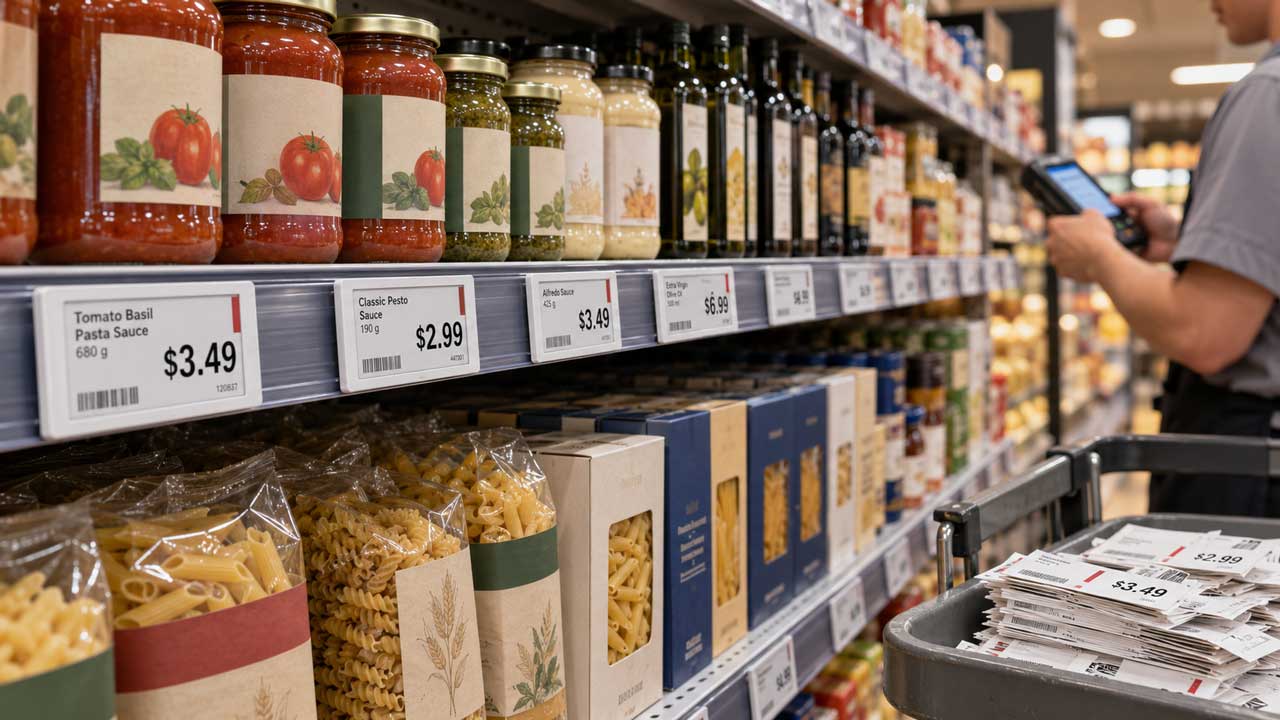
Sixteen cents. That’s roughly what a single printed shelf tag costs you by the time you factor in the paper, the printer ribbon, the labor to walk the aisle, and the reprint when someone fat fingers a price. Sixteen cents sounds like nothing until you’re running a store with eight thousand SKUs and a promo calendar that changes twice a week.
I spent a season working floor shifts at a grocery store that ran weekly price changes, and the ritual was always the same: pull the old tags, print new ones, walk the aisle with a stack and a scanner, fix the four you got wrong, then do it again next Tuesday. That’s the real problem paper created, and it’s the reason a growing number of retailers are quietly putting thin screens where cardboard tags used to hang.
If you’ve priced out that switch lately, you’ve probably noticed the software side matters more than the hardware. A screen is just a screen until something pushes a price to it, and that’s where a platform like digital signage starts to make sense for stores that don’t want to build their own update pipeline.
Why paper tags cost more than the paper
Retailers tend to treat shelf tags as a rounding error. They’re not. The cost isn’t the tag itself, it’s the loop around it: someone has to notice a price changed, print the replacement, find the right shelf, swap it, and verify it happened. Multiply that loop by every promotion, every markdown, every supplier cost bump, and you start to see why labor eats the budget.
The regulatory side adds teeth too. Under the Occupational Safety and Health Act, employers carry a general duty to keep workplaces free from recognized hazards, and clerks stretching overhead or kneeling on ladders to reach top shelves are exactly the kind of recurring exposure that shows up in incident logs. You can read the baseline at the U.S. Department of Labor. Fewer trips up a ladder is a real win, and it’s one most stores never count when they price the switch.
My honest take: if you run fewer than 300 SKUs and change prices less than monthly, paper is fine and screens are a vanity purchase. If you’re above that, the labor math flips fast.
What actually changes when the tag becomes a screen
Here’s the part that surprised me the first time I watched a live rollout. The price update is the boring half. The interesting half is everything else you can hang on that same piece of real estate once it’s already there.
You can flash a bundle suggestion next to the pasta when the sauce is on promo. You can push a store specific message during a local event. You can kill a sold out item’s display before a customer stands there confused. None of that required new hardware, just a different thing pushed to a screen that was already mounted.
The maintenance question nobody asks upfront
Every store manager I’ve talked to asks the same thing within five minutes: what happens when the wifi drops? A screen that shows a stale price during a promotion is worse than a paper tag, because paper at least matches what the register charged last week. Any system you buy needs to keep the last known good price visible when the network hiccups, and it needs to recover without someone rebooting it by hand. Ask that question before you sign anything.
A simple rollout order that doesn’t blow up your week
I’d start narrow, and I’d start with the aisle where prices change most often. Here’s the sequence that tends to survive contact with a real store:
- Pick one category with a fast promo cycle, usually beverages or snacks.
- Mount screens only on the shelves you already reprint weekly.
- Run both systems for two full price cycles. Paper stays as the fallback.
- Compare labor hours logged against your pre roll baseline.
- Expand only after two clean cycles with no mismatched prices.
Two cycles is the minimum. One is a fluke, and you’ll talk yourself into expanding too early if you don’t force the second pass.
What I’d skip in year one
Don’t wire every aisle at once. Don’t chase the fancy analytic features that track customer gaze unless you’ve got a specific question you’re trying to answer. Don’t let a vendor talk you into replacing your whole tag infrastructure before you’ve proven the update loop works on forty shelves. Restraint is the difference between a rollout that holds and one that gets ripped out in six months.
Where the money actually shows up
The savings aren’t in the tags. They’re in the hours. If your team currently spends a chunk of every week printing, walking, and fixing, that time goes back to the floor, and floor time is where sales happen. That’s the whole pitch, and it’s a boring one, which is probably why more stores haven’t done it.
There’s a second layer if you sell anything with a compliance angle. Standards work like the guidance published by the National Institute of Standards and Technology keeps showing up in how retailers think about labeling accuracy and traceability, and a screen that pulls from your central price file is a cleaner audit trail than a drawer of loose cardboard.
None of this is glamorous. It’s the same reason stores eventually moved off handwritten inventory sheets.
What the shift says about retail’s direction
Broad retail employment trends from the U.S. Census Bureau keep pointing in one direction: fewer people doing repetitive manual work and more emphasis on service and merchandising. Screens fit that curve because they move the repetitive part into software. The stores that figure this out early won’t win because they bought hardware. They’ll win because they stopped burning payroll on a task a system can handle.
If you take one thing from this, take the two cycle rule. Prove the loop on forty shelves before you touch four hundred. That’s the whole discipline.
So here’s the question worth sitting with: if you mapped your store’s weekly price change hours right now, what would that number actually be? Most managers guess low. Pull the real figure and the decision usually makes itself.